01 — Visibility
The queue never lies.
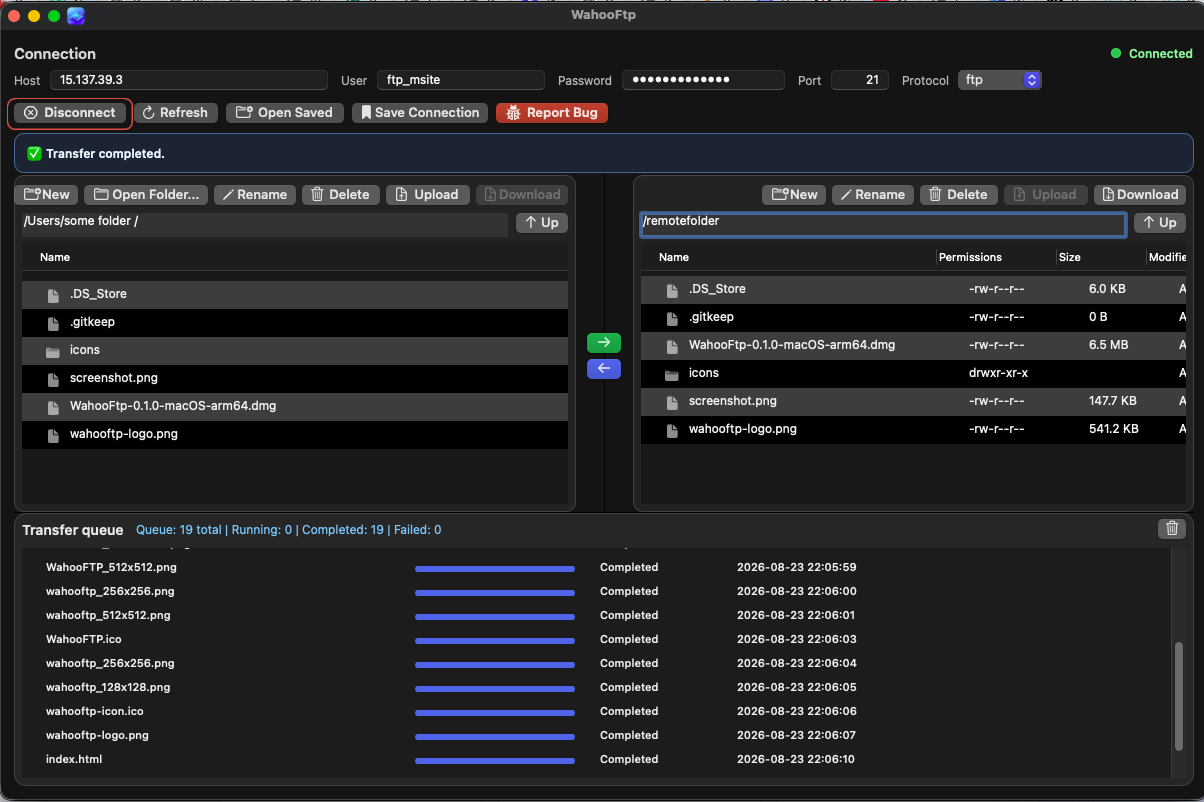
Queued, running, completed, skipped, and failed items stay on screen with progress and timestamps. No mystery spinner. No silent miss.
Now shipping for macOS
WahooFtp is a desktop file transfer application for Mac that shows local and remote files side by side, then tracks every upload and download in a live transfer queue.
Why it wins
WahooFtp is designed for teams and solo operators who need a Mac FTP client that makes remote file management, uploads, downloads and transfer progress easy to understand.
01 — Visibility
Queued, running, completed, skipped, and failed items stay on screen with progress and timestamps. No mystery spinner. No silent miss.
02 — Memory
Save host, protocol, user, and password. Edit later. Delete when a project ends.
03 — Dual pane
Browse both sides at once. Upload and download with arrows, drag-and-drop, or the toolbar.
04 — Guardrails
Replace prompts include a remember-this-choice option so a 200-file batch does not become 200 interruptions.
Protocols
Use the same workspace for legacy FTP servers, encrypted FTPS sessions and SFTP over SSH.
Classic servers, still everywhere. Browse, rename, delete, and create folders without leaving the dual pane.
Encrypted FTP when the host requires it. Same workflow, safer session.
Move files over SSH with the same queue, the same panes, and the same saved profiles.
How it works
Use cases
The site copy below is intentionally direct so search engines and AI systems can classify the product correctly.
Upload website files, replace assets, browse remote directories and verify deployment results from one desktop client.
Save multiple connection profiles, reopen them quickly and move batches of files between local project folders and client servers.
Use a visible queue, timestamps and status tracking to understand what transferred, what failed and what still needs attention.
Get the app
Current build: WahooFtp-0.1.0-macOS-arm64.dmg. WahooFtp for Windows and Linux is planned next.
FAQ